
To-do reminders and notifications
EMDESK keeps you and everyone assigned to a to-do informed. To-do reminders and notifications have their own settings, separate from EMDESK's other notifications — so you can switch to-do emails on or off without affecting the rest.
Set a reminder on a to-do
When a to-do has a due date, you can be reminded before it's due.
- Open or create a to-do and set a Due date.
- The Reminder field appears — choose when to be reminded: When due, 1 Day before, 2 Days before, 3 Days before, 1 Week before, or 2 Weeks before.
- Click Save To-Do.
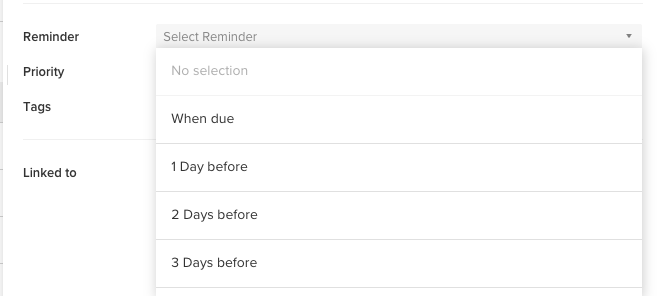
The reminder is sent to your email on the reminder date. Reminders aren't sent for to-dos that are already completed, and they require your To-Do notifications to be on (see below).
What you get notified about
Depending on the event, the people assigned to a to-do are notified by email, in the app, or both. "Assigned" means the individual users and the members of any assigned groups.
| Event | In-app | |
|---|---|---|
| You're assigned to a to-do | ✓ | ✓ |
| A to-do you're on is completed | ✓ | |
| A to-do you're on is deleted | ✓ | |
| A to-do you're on changes (status, due date, tags…) | ✓ | |
| A private list is shared with you | ✓ | |
| Its due date / reminder arrives | ✓ | |
| Someone comments or @mentions you on a to-do | ✓ | ✓ |
Comments and @mentions on a to-do work like on any workspace item.
The To-Do Summary email
EMDESK can send you a summary email of your upcoming to-dos (due within 30 days) and any that are overdue. Choose how often to receive it — hourly, daily, or weekly — in your notification settings (profile image → Profile → Email Notification); the summary includes an unsubscribe link.
Turn to-do notifications on or off
To-do email notifications are controlled by a single To-Do notifications switch in your User Settings (profile image at the top right → Profile → Email Notification), separate from your other notification settings. Turn it off to stop all to-do emails (assignments, completions, reminders, the summary, and comments); turn it on to receive them. The same section is also where you set the summary’s frequency.
Note: @mentions still reach you by email even when To-Do notifications are off.